these instructions are only for customers who has purchased a valid license
IMPORTANT LICENSE INFORMATION
A Darts for Windows license is a fixed license and it is bound to the hard-drive on the computer where you activated it.
IF YOUR LICENSE IS LESS THAN 5 YEARS OLD, IT CAN BE DEACTIVATED AND MOVED TO A NEW COMPUTER AT NO COST BY FOLLOWING THE INSTRUCTIONS BELOW.
IF THE LICENSE IS MORE THAN 5 YEARS OLD; YOU WILL HAVE TO BUY A NEW ONE.
You cannot use your license on another machine or hard-drive until you deactivate it using the license removal tool if your period of free upgrades has expired (expires 12 months after purchase) and the license is less than 5 years old. Deactivating a license removes the license data from the machine and sends the confirmation of the removal to the license server so that you can later activate the license on another machine. The Darts for Windows serial number will also change after deactivation so that you no longer can use the license on the computer it was originally licensed for. The deactivation procedure should be done in the following cases:
- You are going to leave a team and need to hand over the license to another person.
- You want to move the license to some other computer.
- The computer where Darts for Windows is installed has some technical issues and will be retired.
- There will be an upgrade to the computer, which requires reinstalling the operating system.
- Change of hard drive.
When you change your computer or formatting the hard-drive or you reinstall Windows, the DfW serial number will no longer match and all license information is lost.
Darts for Windows is licensed by hard-drive/computer, not user and there is no way we can detect if a license is still in use or not. Removing the license from the license server will not stop the license from working so the customer is responsible for deactivating the license, Darts for Windows can not do it for you.
PLEASE NOTE THAT YOUR COMPUTER CONTAINING THE ORIGINAL LICENSE MUST BE CONNECTED TO THE INTERNET WHILE YOU RUN THE LICENSE REMOVAL TOOL TO BE ABLE TO REGISTER THE LICENSE REMOVAL
After the removal, you will be eligible to register the new serial number you require a unlock code for on this page and also continue to get free updates, even if the period of free upgrade has expired.
If you fail to follow the license removal procedure or the license server is not able to register the license removal or you are not able to deactivate the old license due to various reasons, you will have to buy a new license since your original license will still be registered as active and in use.
Darts for Windows does not come with any kind of insurance, the 12 moths rule will still apply if your computer is stolen, damaged or technical difficulties.
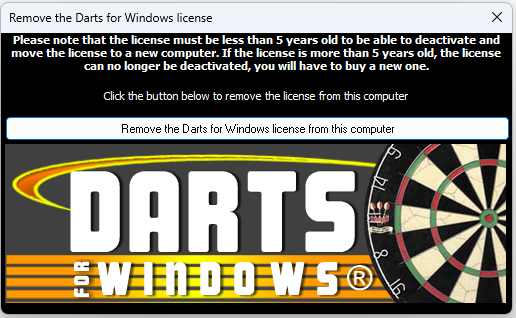
Download the license removal tool from here.
On Windows Vista or higher, the license removal tool must be run as an administrator!
After the license has been removed, contact the author of Darts for Windows to make sure
the license removal has been registered by the license server. When you have received the confirmation of the removal, you can now register the new license
here.
This is how the license removal tool looks like: