make sure you have installed Darts for Windows on the correct computer.
When you buy this program, you must complete the registration form under to be able to use the full version.
The information you post will be saved to the online license database and the information
will be forwarded to the author of Darts for Windows who manually creates the activation code
and uploads it to the license database.
As soon as possible after the author has received the registration, he uploads the activation code to the license server.
You will receive an automated e-mail with the activation instructions as soon as the code has been uploaded.
The unique Darts for Windows serial number is created by a complex random generator upon your first install of the demo version.
There is no way I can guess or know your Darts for Windows serial number, that is the reason why you must register the serial number in
the form below.
It may take up to 24 hours before you receive the activation instructions, but normally is will take just a few minutes if the author is online.
If you have not installed the demo version of Darts for Windows, download and istall it from the link on left side of the front page.
Darts for Windows must be installed on your computer to get access to the serial number. Click here to go to the front page.
Please fill in this form and then click the submit button
Note that the name or e-mail address should normally match the name or e-mail address you used when you paid at
PayPal.
This is to make sure the correct person gets the activation code.
The activation code is e-mailed to the address you register below
so please make sure the e-mail address is valid and
correct or else you will not receive the activation code.
If you pay for someone else, or your name and e-mail address does not match the buyer's name and e-mail address
or if you have a question, please put in a message to the author in the optional message field.
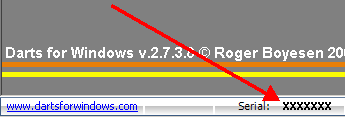
The pictures below shows where to find the serial number in the trial version.
START THE TRIAL VERSION - THE SERIAL NUMBERS BELOW ARE ONLY SAMPLES
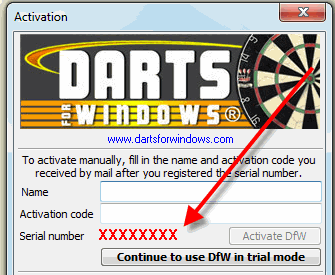
The serial number is also visible on the lower left side of the trial version.